
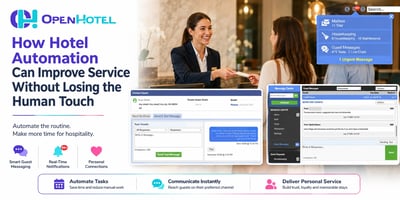
Hotel automation is often misunderstood.
Check Your Guest Contact Workflow: From Reservation to Post-Stay
Check Your Guest Contact Workflow: From Reservation to Post-Stay
Guest communication rarely happens in just one place or at one moment.
It can start immediately after a reservation is made, continue with arrival information and check-in instructions, move into questions and requests during the stay, and finish with post-stay communication.
But there's one important question every hotel should ask:
What happens when the contact information your workflow depends on isn't available?
Recent changes in how some OTAs share guest phone numbers make this question especially relevant. If your property depends on a mobile number for automated messages, self check-in instructions, SMS communication, or other parts of the guest journey, now is a good time to review what happens at every step.
The goal isn't simply to send more messages.
It's to make sure guests receive the right information at the right time and your team can keep track of the conversation.
1. Start With the Reservation
Think about your current guest journey:
Reservation → Pre-arrival → Arrival → During the stay → Departure → Post-stay
Now ask where communication happens at each stage.
Which messages are sent automatically? Which require a staff member? Which depend on an email address? Which require a mobile number? And what happens when that information isn't available?
This becomes particularly important with OTA reservations because the information provided to your PMS can depend on what the booking channel shares.
A simple workflow review can uncover communication gaps before they become guest-service problems.
2. Pre-Arrival Communication Shouldn't Start at the Front Desk
Guests often need information before they ever arrive at the property.
They may need to know:
- Check-in times
- Parking information
- Directions
- Property policies
- What to bring
- Self check-in instructions
- Important information about their reservation
This is where OpenHotel Responses, included with the PMS, can help.
Properties can create predefined communications based on what they want guests to receive before arrival, during the stay, or after departure.
Instead of your team repeatedly writing the same information, commonly needed communication can become part of a more consistent guest journey.
Think of automation as preparation, not a service replacement.
If every arriving guest needs the same basic information, your team shouldn't have to recreate that message every time.
The technology can handle the repetitive communication so employees have more time for the conversations that actually require them.
3. Know When Your Workflow Depends on a Phone Number
Email and automated Responses can cover part of the journey, but there are times when hotels want a more immediate connection with the guest.
That's where SMS Guest Messaging can extend the communication workflow.
Properties that upgrade their Responses functionality to include SMS can communicate directly with guests by text when a mobile number is available.
This can be especially useful once a guest arrives or when your team needs to communicate during the stay.
For an OTA reservation where the phone number wasn't originally included, the property can add the guest's mobile number once it becomes available and use SMS messaging as part of the guest communication process.
That gives your team another way to stay connected without forcing every interaction through a phone call or front-desk visit.
4. Give Guests More Than One Way to Reach You
Consider a guest who has already checked in and needs something simple.
Extra towels.
A maintenance request.
A question about an amenity.
Information about checkout.
The guest doesn't necessarily want to walk to the front desk or wait on hold.
With OpenHotel SMS Guest Messaging, communication can happen directly through text, while the hotel team can manage those conversations through the Message Center or from the reservation details.
That connection is important.
The message isn't separated from the hotel operation. Your team has a clearer way to understand who the guest is and keep communication connected to their stay.
5. Centralize the Conversation With Message Center
Guest communication gets complicated when information is scattered.
A guest sends a message.
Housekeeping receives a request.
Maintenance needs to follow up.
Another employee needs to know what happened.
An OTA review arrives.
When each interaction lives somewhere different, employees spend more time trying to figure out where the information is.
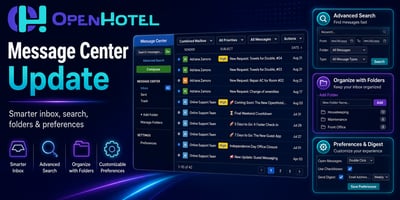
OpenHotel's Message Center helps centralize communication and operational information in one environment, including:
Guest messages | Staff communication | Department requests | Housekeeping | Maintenance | OTA reviews
Instead of communication becoming a collection of disconnected conversations, your team has a more centralized place to follow what's happening.
And that matters beyond convenience.
Better visibility helps create continuity.
If one employee starts a conversation and another needs to continue it later, the guest shouldn't have to start over.
6. Connect Guest Communication With Staff Communication
A fast response to the guest often depends on something happening behind the scenes.
Imagine a guest messages:
“Could we get extra towels?”
The guest-facing communication is only one part of the request.
Someone needs to receive it. Housekeeping may need to act on it. The request needs to be completed. And ideally, the next employee interacting with that guest should know what has already happened.
That's why guest communication and internal hotel communication shouldn't be treated as completely separate workflows.
OpenHotel's connected environment helps teams keep guest messages, departmental communication, requests, and operational information closer together.
The objective is simple:
Less chasing information. More responding to guests.
7. Don't Forget the Post-Stay Journey
Checkout doesn't necessarily end the relationship.
Post-stay communication gives properties another opportunity to thank guests, provide useful information, and continue the relationship after departure.
With predefined Responses, properties can build post-stay communication into the same broader strategy used for pre-arrival and during-stay messaging.
This creates a more complete journey:
Before the stay
Prepare and inform.
During the stay
Stay accessible and respond.
After the stay
Follow up and stay connected.
Rather than treating each message as an isolated task, think of communication as part of the entire guest experience.
Build a Workflow That Can Handle the Exceptions
Automation works best when everything goes according to plan.
Hospitality rarely does.
A guest may not provide a mobile number. An OTA may not pass certain contact information to the PMS. A message may require human attention. A maintenance issue may need another department. A guest may prefer to speak with someone directly.
That's why the strongest communication workflow isn't simply the one with the most automation.
It's the one where your team knows what happens next.
Take a few minutes and map your process:
Reservation → Pre-arrival → Self check-in → SMS → During-stay → Staff requests → Post-stay
For each stage, ask:
What information do we need? How do we communicate? Who is responsible? And what happens if the information isn't available?
Those four questions can reveal a lot.
Technology Handles the Connection. Your Team Creates the Hospitality.
A predefined message can deliver check-in information.
An SMS can make it easier for a guest to ask a question.
The Message Center can help your staff see what's happening.
Internal communication can help get a request to the right department.
But technology isn't the hospitality.
Your team is.
The purpose of connected hotel technology is to remove unnecessary communication barriers so your employees can spend less time searching, repeating, and switching between tasks—and more time taking care of guests.
That's the real opportunity behind a better guest contact workflow.
Ready to Review Your Communication Options?
If you're already using OpenHotel, talk with our team about Responses included with your PMS and whether adding SMS Guest Messaging could help your property create a more connected guest communication experience.